<?xml version="1.0" encoding="utf-8"?><feed xmlns="http://www.w3.org/2005/Atom" ><generator uri="https://jekyllrb.com/" version="3.10.0">Jekyll</generator><link href="https://dharmjit.github.io/feed.xml" rel="self" type="application/atom+xml" /><link href="https://dharmjit.github.io/" rel="alternate" type="text/html" /><updated>2026-09-21T16:32:31+00:00</updated><id>https://dharmjit.github.io/feed.xml</id><title type="html">Dharmjit Singh</title><subtitle>Still figuring...</subtitle><entry><title type="html">Starting with git: part1</title><link href="https://dharmjit.github.io/Starting-With-Git-Part1/" rel="alternate" type="text/html" title="Starting with git: part1" /><published>2016-11-04T00:00:00+00:00</published><updated>2016-11-04T00:00:00+00:00</updated><id>https://dharmjit.github.io/Starting%20With%20Git:%20Part1</id><content type="html" xml:base="https://dharmjit.github.io/Starting-With-Git-Part1/"><![CDATA[<p>Developers understand the value of version control management for the application we are developing. Small project can survive version control but if we are creating enterprise level applicaiton and not using any version control we are in big trouble. I am not going to write about the various version control systems available and which one is better in this post but start directly with the GIT version control which currently is the most popular version control.
In this post I will cover the basic setup and start the coding. I will take example of a small team of 2 persons(foo and bar) going to start coding of a project and they are thinking of using git as version control software.</p>

<h2 id="basic-setup">Basic Setup</h2>
<p>Being distributed version control, It seems that it is difficult to set up. But believe me its not. We need to install git softwares on all the machines where we need to use version control. First of all we need to maintain one central repository, which could be on different server or one of the developer machines by using below command</p>

<p><em>ssh user@host git init –bare /path/to/repo.git</em></p>

<p>In above command we need to provide the user,host,path and repo as per our needs. The bare options doesnt allow this to be working directory which we want for our central directory.</p>

<h3 id="cloning">Cloning</h3>
<p>Now foo and bar will clone this central repo to their machine which will create local repositories in their respective machines using below command. Cloning will also add a shortcut called origin which points to the remote central repositories</p>

<p><em>git clone ssh://user@host/path/to/repo.git</em></p>

<h3 id="editstagecommit-process">Edit/Stage/Commit Process</h3>

<p>Now both foo and bar have their respective repository which is local copy of the central repository. They can work on their respective task with whatever IDEs they are using by opening local repo copy on their machine. They can use edit/stage/commit model of Git, which means add it and commit it.
The above steps will ensure that your changes are being tracked in your local repositories regardless what other developer is working on. Below commands are used to see the status of our local repo which will tell us about the modified file which we can then add to staging area and commit to our local copy.</p>

<p><em>git status # View the state of the repo</em></p>

<p>_git add <some-file> # Stage a file_</some-file></p>

<p><em>git commit # Commit a file&lt;/some-file&gt;</em></p>]]></content><author><name></name></author><summary type="html"><![CDATA[Developers understand the value of version control management for the application we are developing. Small project can survive version control but if we are creating enterprise level applicaiton and not using any version control we are in big trouble. I am not going to write about the various version control systems available and which one is better in this post but start directly with the GIT version control which currently is the most popular version control. In this post I will cover the basic setup and start the coding. I will take example of a small team of 2 persons(foo and bar) going to start coding of a project and they are thinking of using git as version control software.]]></summary></entry><entry><title type="html">Understanding Docker as a developer: Part1</title><link href="https://dharmjit.github.io/Docker-1/" rel="alternate" type="text/html" title="Understanding Docker as a developer: Part1" /><published>2016-11-03T00:00:00+00:00</published><updated>2016-11-03T00:00:00+00:00</updated><id>https://dharmjit.github.io/Docker-1</id><content type="html" xml:base="https://dharmjit.github.io/Docker-1/"><![CDATA[<p>I am always excited to see new tools in the developers world and always wonder what good they can bring in the programmers life. Lately I used Docker and felt that this is what I always need. Like most developers I write code on my laptop or development machine. And ofcourse It runs on window or mac and mostly the production or qualification environment is linux based and very different from our development machine. And then mess happens when we deploy our application in production.
Below I have tried to sum up my understanding and the basic questions that comes to everyones mind before using docker.</p>

<h3 id="why-use-docker">Why use Docker?</h3>
<p>Due to different operating systems ,system packages, application supporting packages in the various environments of software development lifecycle, sometimes our application doesn’t run as expected. We need something that ensures that our application, related packges are same in every environment.</p>

<h3 id="what-is-docker">What is Docker?</h3>
<p>Docker as the name suggests, are kind of containers that wrap a piece of software in a complete filesystem that contains everything needed to run: code, runtime, system tools, system libraries – anything that can be installed on a server. This guarantees that the software will always run the same, regardless of its environment.</p>

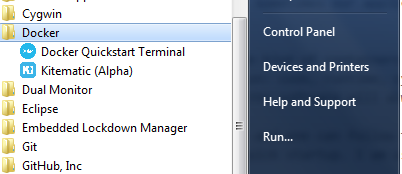
<p>Installing Docker is super-easy and one can follow the steps at <a href="https://www.docker.com/products/docker#/">docker</a> site for the installation and quick startup guide. I am using windows and you will see these application installed after the installer exits.</p>

<p><img src="/images/docker1.png" alt="docker1.png" /></p>

<p>You can open Docker Quickstart Terminal and can play with it by running basic commands(shown below).</p>

<p><strong>docker –version</strong> shows the version related information</p>

<p><strong>docker –help</strong> shows the varios docker related commands</p>

<p><strong>docker images</strong> shows the various images in your docker machine</p>

<p><strong>docker ps</strong> shows the various containers in your docker machine</p>

<p>Lets dive deeper.</p>

<h3 id="what-is-an-image">What is an image?</h3>
<p>Docker is based on concept of images which could be base OS or some other minimal image. Over this base image we can create more images by adding softwares, system packages, third party applications as required in development cycle. So the various changes made to the base image are saved in layes forming different images.
 The base image we can create ourselves by using dockerfile or downloading some image from <a href="https://hub.docker.com/">docker hub</a>.</p>

<p>Below is the screenshot from my machine and you can see base image is ubuntu and with additional changes I create new images that is similar to version control where we have differnt versions of source code but in docker we are maining incremental images upon commiting.</p>

<p><img src="/images/docker2.png" alt="docker2.png" /></p>

<h3 id="what-is-a-container">What is a container?</h3>
<p>Now whats the purpose of images if we dont run it and use it. Whenever we start an image of our interest, docker create containers which are kind of instance of that image. we can run multiple conatiners of an image. In the screenshot below I started an image in my docker with bash shell or I can run it in background. I can see the list of running containers with the command <strong>docker ps</strong></p>

<p><img src="/images/docker3.png" alt="docker3.png" /></p>

<h3 id="accessing-our-container-from-host-network-or-some-other-containers">Accessing our container from host network or some other containers?</h3>
<p>There are basically 3 approaches for this</p>
<ol>
  <li>Exposing ports</li>
  <li>Port Binding</li>
  <li>Linking Containers</li>
</ol>

<p>More about this in my next post. Let me know for any questions/corrections.</p>]]></content><author><name></name></author><summary type="html"><![CDATA[I am always excited to see new tools in the developers world and always wonder what good they can bring in the programmers life. Lately I used Docker and felt that this is what I always need. Like most developers I write code on my laptop or development machine. And ofcourse It runs on window or mac and mostly the production or qualification environment is linux based and very different from our development machine. And then mess happens when we deploy our application in production. Below I have tried to sum up my understanding and the basic questions that comes to everyones mind before using docker.]]></summary></entry></feed>